Multi-stage builds
Multi-stage builds (introduced in Docker version 17.06 CE) allow users to create Dockerfiles that contain
multiple build stages. With this in place, you can then copy build artifacts from one stage to
another while leaving behind all the dependencies that were required to perform the build. This is
another tool used to build more optimized Docker images. Each stage in the build is started with
a FROM statement in the Dockerfile.
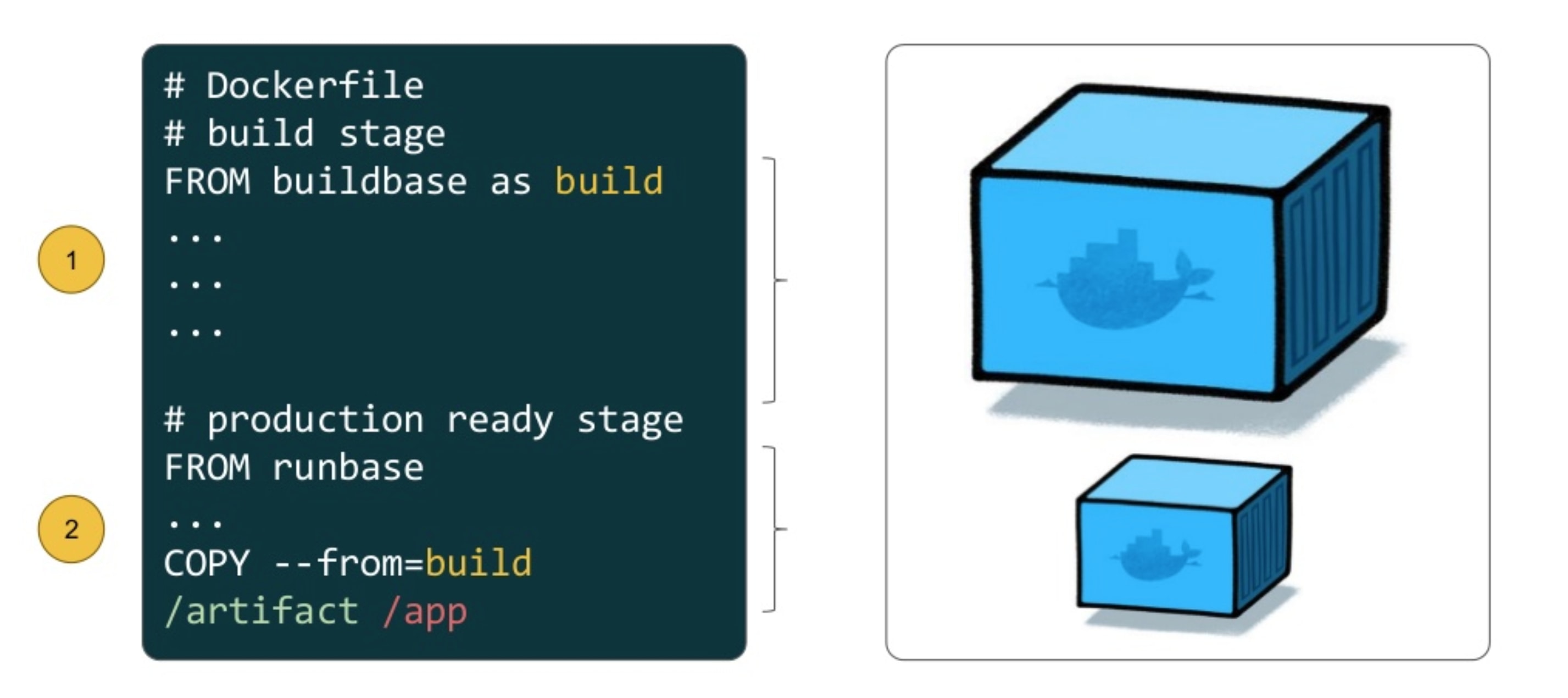
Multiple stages of a Dockerfile
Prerequisites
Mac
Windows
Linux
A simple example
Let’s create a very simple Go application:
$ cd ~/
$ mkdir hellogo/
$ cd hellogo/
$ touch Dockerfile
$ pwd
/Users/username/hellogo/
$ ls
Dockerfile
Now, grab a copy of the Go source code that we want to containerize:
package main

import (
    "fmt"
    "os/user"
)

func main () {
    user, err := user.Current()
    if err != nil {
        panic(err)
    }

    fmt.Println("Hello, " + user.Username + "!")
}
You can cut and paste the code block above into a new file called,
app.go, or download it from the following link:
https://github.com/cdkharris/containers-at-arc/blob/main/docs/scripts/app.go
Now, you should have two files and nothing else in this folder:
$ pwd
/Users/username/hellogo/
$ ls
Dockerfile  app.go
Edit the Dockerfile and enter the following:
FROM golang:1.21
WORKDIR /src

COPY app.go .

RUN CGO_ENABLED=0 go build -o /usr/local/bin/hello ./app.go

CMD [ "/usr/local/bin/hello" ]
We’re going to base our image on the official Go image
(based on Debian Bookworm) and specify a tagged
version (1.21). Then, we’re going to simply copy in the Go source code (app.go) and compile it to an
executable called hello. Running this executable will also be our default command. Next, we’ll create
a Docker image and run a container from that image:
$ docker build -t <username>/hellogo:0.0.1 .
[+] Building 5.7s (8/8) FINISHED                                                                                  docker:desktop-linux
 => [internal] load build definition from Dockerfile                                                                              0.1s
 => => transferring dockerfile: 162B                                                                                              0.1s
 => [internal] load .dockerignore                                                                                                 0.1s
 => => transferring context: 2B                                                                                                   0.0s
 => [internal] load metadata for docker.io/library/golang:1.21                                                                    0.0s
 => [internal] load build context                                                                                                 0.0s
 => => transferring context: 28B                                                                                                  0.0s
 => CACHED [1/3] FROM docker.io/library/golang:1.21                                                                               0.0s
 => [2/3] COPY app.go .                                                                                                           0.2s
 => [3/3] RUN CGO_ENABLED=0 go build -o /usr/local/bin/hello ./app.go                                                             5.0s
 => exporting to image                                                                                                            0.2s
 => => exporting layers                                                                                                           0.2s
 => => writing image sha256:d7ba5612bc490f5645eda701b179ce2ecce4f51280bae66db7e5ea7ccbf2a79d                                      0.0s
 => => naming to docker.io/eriksf/hellogo:0.0.1
$ docker run --rm <username>/hellogo:0.0.1
Hello, root!
Let’s take a look at the size of our image:
$ docker images <username>/hellogo
REPOSITORY       TAG       IMAGE ID       CREATED             SIZE
eriksf/hellogo   0.0.1     d7ba5612bc49   3 minutes ago       851MB
OK, let’s see if we can reduce the size of our image by using multiple stages. Create a new
Dockerfile named Dockerfile.ms.
$ touch Dockerfile.ms
$ pwd
/Users/username/hellogo/
$ ls
Dockerfile  Dockerfile.ms  app.go
Edit Dockerfile.ms and enter the following:
FROM golang:1.21 AS build
WORKDIR /src

COPY app.go .

RUN CGO_ENABLED=0 go build -o /usr/local/bin/hello ./app.go

FROM alpine:3.18.3

COPY --from=build /usr/local/bin/hello /usr/local/bin/hello

CMD [ "/usr/local/bin/hello" ]
We’ve now got a Dockerfile with two build stages (starting with the FROM statements). The first stage grabs
an image with all the Go tools installed, copies in our source code, and compiles it to an executable. In the
second stage, we start with an Alpine linux image (small, simple, and lightweight
Linux distribution) and then just copy in the executable from the build stage while jettisoning all the Go tools.
Note
Note that we named our build stage, FROM golang:1.21 as build. This makes it easier to read and
identify the stage when copying from it.
Now, we’ll create a new Docker image and run a container from that new image:
$ docker build -t <username>/hellogo:0.0.2 -f Dockerfile.ms .
[+] Building 6.7s (13/13) FINISHED                                                                                docker:desktop-linux
 => [internal] load build definition from Dockerfile.ms                                                                           0.1s
 => => transferring dockerfile: 270B                                                                                              0.0s
 => [internal] load .dockerignore                                                                                                 0.1s
 => => transferring context: 2B                                                                                                   0.0s
 => [internal] load metadata for docker.io/library/alpine:3.18.3                                                                  1.2s
 => [internal] load metadata for docker.io/library/golang:1.21                                                                    0.0s
 => [auth] library/alpine:pull token for registry-1.docker.io                                                                     0.0s
 => [build 1/4] FROM docker.io/library/golang:1.21                                                                                0.0s
 => CACHED [stage-1 1/2] FROM docker.io/library/alpine:3.18.3@sha256:7144f7bab3d4c2648d7e59409f15ec52a18006a128c733fcff20d3a4a54  0.0s
 => CACHED [build 2/4] WORKDIR /src                                                                                               0.0s
 => [internal] load build context                                                                                                 0.0s
 => => transferring context: 28B                                                                                                  0.0s
 => [build 3/4] COPY app.go .                                                                                                     0.2s
 => [build 4/4] RUN CGO_ENABLED=0 go build -o /usr/local/bin/hello ./app.go                                                       4.8s
 => [stage-1 2/2] COPY --from=build /usr/local/bin/hello /usr/local/bin/hello                                                     0.2s
 => exporting to image                                                                                                            0.1s
 => => exporting layers                                                                                                           0.1s
 => => writing image sha256:2c2ab690cadf84cbf0f03d87effea87b1ff7726db0a4c3aabfbd18c3656975a4                                      0.0s
 => => naming to docker.io/eriksf/hellogo:0.0.2
$ docker run --rm <username>/hellogo:0.0.2
Hello, root!
Note
As a debugging tool, you can also stop the build at a specific stage, i.e.
docker build --target build -t <username>/hellogo:0.0.2 -f Dockerfile.ms ..
Finally, let’s see if we actually reduced our image size by using the multi-stage build.
$ docker images <username>/hellogo
REPOSITORY       TAG       IMAGE ID       CREATED          SIZE
eriksf/hellogo   0.0.2     2c2ab690cadf   7 minutes ago    9.62MB
eriksf/hellogo   0.0.1     d7ba5612bc49   27 minutes ago   851MB
Note
When using multi-stage builds, you are not limited to only copying from stages created earlier in the Dockerfile.
You can also copy from another image, either locally or on another registry. For example,
COPY --from=nginx:latest /etc/nginx/nginx.conf /nginx.conf, which will get the latest nginx image from
Docker Hub and grab only the default configuration file.
A real-world example
Let’s take a look at a more robust, real-world example. Pull a copy of the calculate-pi (https://github.com/eriksf/calculate-pi) project from GitHub.
Note
Rather than clone the calculate-pi repository at https://github.com/eriksf/calculate-pi, it’s better to fork it and clone your own repository.
$ git clone git@github.com:<username>/calculate-pi.git
$ cd calculate-pi
$ tree .
.
├── Dockerfile
├── LICENSE.txt
├── README.md
├── calculate_pi
│   ├── __init__.py
│   ├── pi.py
│   └── version.py
├── poetry.lock
├── pyproject.toml
└── tests
    ├── __init__.py
    ├── responses
    │   └── help.txt
    └── test_calculate_pi.py

4 directories, 11 files
In the Containerize Your Code section, we introduced some Python code to calculate Pi. This is basically the same code but built using Poetry and adding in the Click module for creating a command line interface. Poetry is a tool for Python packaging and dependency management. It is a bit like having a dependency manager and a virtual environment rolled into one with the ability to handle publishing to PyPI as well.
The important file that controls the package and dependencies is pyproject.toml.
$ cat pyproject.toml
[tool.poetry]
name = "calculate-pi"
version = "0.4.0"
description = "Calculate Pi python poetry project demo"
authors = ["Erik Ferlanti <eferlanti@tacc.utexas.edu>"]
license = "BSD 3-Clause"
readme = "README.md"
repository = "https://github.com/eriksf/calculate-pi"
packages = [{include = "calculate_pi"}]

[tool.poetry.dependencies]
python = "^3.11"
click = "^8.1.7"
click-loglevel = "^0.5.0"

[tool.poetry.scripts]
calculate-pi = "calculate_pi.pi:main"

[tool.poetry.group.dev.dependencies]
pytest = "^8.3.2"
pytest-cov = "^5.0.0"
ruff = "^0.6.3"

[tool.ruff]
select = ["E", "F", "I"]
fixable = ["ALL"]
exclude = [".git", ".ruff_cache", ".vscode"]
line-length = 300

[tool.pytest.ini_options]
addopts = "--verbose --cov=calculate_pi"

[tool.poetry_bumpversion.file."calculate_pi/version.py"]

[build-system]
requires = ["poetry-core"]
build-backend = "poetry.core.masonry.api"
We show this file only to give some insight into how the Dockerfile will be used to build the project. In this new poetry-based calculate-pi Python package, we’ll discuss each of the important Dockerfile sections in detail.
In the first part of stage 1 (build stage), we’re going to base our image on a tagged version (3.9.17) of the official Python image
(based on Debian Bookworm), label it poetry,
and then install a version (1.5.1) of poetry using pip
(the package installer for Python).
FROM python:3.11.9-bookworm AS poetry
ENV POETRY_VERSION="1.8.3"

RUN pip install "poetry==${POETRY_VERSION}"
Next, we’ll set the working directory to /calculate_pi, copy in the important files that dictate
what gets installed, and then run poetry export to create a text-based file that lists the required
dependencies.
WORKDIR /calculate_pi

COPY pyproject.toml poetry.lock ./

RUN poetry export -f requirements.txt --output requirements.txt --without-hashes
Next, we’ll copy in the README, LICENSE, and source code and then run poetry build to build a
Python wheel, a built distribution file for the Python package
compatible with your system.
COPY README.md LICENSE.txt /calculate_pi/
COPY calculate_pi /calculate_pi/calculate_pi/

RUN poetry build
At this point, we have the two important files needed from the build section; requirements.txt and a wheel file. Moving on to the second stage of the Dockerfile, we’ll again base our image on the same official Python image, update the OS in the image, and set up the Python environment.
FROM python:3.11.9-bookworm
LABEL maintainer="Erik Ferlanti <eferlanti@tacc.utexas.edu>"

# Update OS
RUN apt-get update && apt-get install -y \
    vim-tiny \
    && rm -rf /var/lib/apt/lists/* /tmp/* /var/tmp/*

# Configure Python/Pip
ENV PYTHONUNBUFFERED=1 \
    PYTHONDONTWRITEBYTECODE=1 \
    PYTHONFAULTHANDLER=1 \
    PIP_NO_CACHE_DIR=off \
    PIP_DISABLE_PIP_VERSION_CHECK=on \
    PIP_DEFAULT_TIMEOUT=100
Next, we’ll again set the working directory to /calculate_pi, copy the requirements.txt file
from the build (labeled poetry) stage, and use pip to install the dependencies from the requirements file.
WORKDIR /calculate_pi

COPY --from=poetry /calculate_pi/requirements.txt .

RUN pip install -r requirements.txt
Finally, we’ll copy the wheel file from the build (labeled poetry) stage, use pip to install the calculate-pi package from the wheel, copy in the README file, and set the default command to run the help for calculate-pi tool.
COPY --from=poetry /calculate_pi/dist/*.whl ./

RUN pip install *.whl

COPY README.md LICENSE.txt /calculate_pi/

CMD [ "calculate-pi", "--help" ]
For reference, here’s what the Dockerfile looks like in total:
FROM python:3.11.9-bookworm AS poetry
ENV POETRY_VERSION = "1.8.3"

RUN pip install "poetry==${POETRY_VERSION}"

WORKDIR /calculate_pi

COPY pyproject.toml poetry.lock ./

RUN poetry export -f requirements.txt --output requirements.txt --without-hashes

COPY README.md LICENSE.txt /calculate_pi/
COPY calculate_pi /calculate_pi/calculate_pi/

RUN poetry build


FROM python:3.11.9-bookworm
LABEL maintainer="Erik Ferlanti <eferlanti@tacc.utexas.edu>"

# Update OS
RUN apt-get update && apt-get install -y \
    vim-tiny \
    && rm -rf /var/lib/apt/lists/* /tmp/* /var/tmp/*

# Configure Python/Pip
ENV PYTHONUNBUFFERED=1 \
    PYTHONDONTWRITEBYTECODE=1 \
    PYTHONFAULTHANDLER=1 \
    PIP_NO_CACHE_DIR=off \
    PIP_DISABLE_PIP_VERSION_CHECK=on \
    PIP_DEFAULT_TIMEOUT=100

WORKDIR /calculate_pi

COPY --from=poetry /calculate_pi/requirements.txt .

RUN pip install -r requirements.txt

COPY --from=poetry /calculate_pi/dist/*.whl ./

RUN pip install *.whl

COPY README.md LICENSE.txt /calculate_pi/

CMD [ "calculate-pi", "--help" ]
In review, what we’ve done in the first stage is to set up Python and poetry to produce the only build artifacts necessary to install our calculate-pi package. Then, in the final stage, we copy in the build artifacts from the build stage and install them in our fresh Python image (getting rid of all the tools necessary for the build). Let’s go ahead and build the image.
$ docker build -t <username>/calculate_pi:0.4.0 .
[+] Building 67.0s (21/21) FINISHED                                                                               docker:desktop-linux
 => [internal] load build definition from Dockerfile                                                                              0.2s
 => => transferring dockerfile: 1.08kB                                                                                            0.0s
 => [internal] load metadata for docker.io/library/python:3.11.9-bookworm                                                         1.4s
 => [auth] library/python:pull token for registry-1.docker.io                                                                     0.0s
 => [internal] load .dockerignore                                                                                                 0.1s
 => => transferring context: 2B                                                                                                   0.0s
 => [internal] load build context                                                                                                 0.1s
 => => transferring context: 25.67kB                                                                                              0.0s
 => [poetry 1/8] FROM docker.io/library/python:3.11.9-bookworm@sha256:c95170ff7d59de63e9445d3d503644a635c1b8cb7f4fa99f19a1c76da  32.4s
 => => resolve docker.io/library/python:3.11.9-bookworm@sha256:c95170ff7d59de63e9445d3d503644a635c1b8cb7f4fa99f19a1c76da92a849a   0.1s
 => => sha256:56c9b9253ff98351db158cb6789848656b8d54f411c0037347bf2358efb18f39 49.59MB / 49.59MB                                  1.8s
 => => sha256:5a3527f112aaefcc63f6f23dbf389ce03d034b49c1c5394707408644c07025cc 2.52kB / 2.52kB                                    0.0s
 => => sha256:11e08854cc7eac324792eebc9d6cc104372d0046ea36d1478b50d29b4832ee33 7.28kB / 7.28kB                                    0.0s
 => => sha256:843b1d8321825bc8302752ae003026f13bd15c6eef2efe032f3ca1520c5bbc07 64.00MB / 64.00MB                                  2.9s
 => => sha256:c95170ff7d59de63e9445d3d503644a635c1b8cb7f4fa99f19a1c76da92a849a 9.07kB / 9.07kB                                    0.0s
 => => sha256:364d19f59f69474a80c53fc78da91f85553e16e8ba6a28063cbebf259821119e 23.59MB / 23.59MB                                  2.2s
 => => sha256:dd681ddda6db196eb0b6eb2fc4e090e214e39ebff8253dc945d3a1654e8faa32 6.24MB / 6.24MB                                    3.0s
 => => extracting sha256:56c9b9253ff98351db158cb6789848656b8d54f411c0037347bf2358efb18f39                                         6.7s
 => => sha256:a348c2a8d94613f34ce7d0ac4fd4e51800d8f4aa8a0bc9347fe5c8436b4c3bd5 202.65MB / 202.65MB                                8.6s
 => => sha256:2fa7159a8e74832a04a5c62397b9b280fcf284a84c7ae4fd0487998cadbdba14 19.49MB / 19.49MB                                  7.3s
 => => sha256:2d3256a435e2e2adde8f5481a0db50dd9cbdc1e8aa48deef0e903b061b520504 232B / 232B                                        3.1s
 => => sha256:8d76c12bea0d1ba610f53eb3454a48928e3275783a38b309fca0887fdb705bda 3.13MB / 3.13MB                                    3.5s
 => => extracting sha256:364d19f59f69474a80c53fc78da91f85553e16e8ba6a28063cbebf259821119e                                         0.5s
 => => extracting sha256:843b1d8321825bc8302752ae003026f13bd15c6eef2efe032f3ca1520c5bbc07                                         3.9s
 => => extracting sha256:a348c2a8d94613f34ce7d0ac4fd4e51800d8f4aa8a0bc9347fe5c8436b4c3bd5                                         9.8s
 => => extracting sha256:dd681ddda6db196eb0b6eb2fc4e090e214e39ebff8253dc945d3a1654e8faa32                                         0.4s
 => => extracting sha256:2fa7159a8e74832a04a5c62397b9b280fcf284a84c7ae4fd0487998cadbdba14                                         1.4s
 => => extracting sha256:2d3256a435e2e2adde8f5481a0db50dd9cbdc1e8aa48deef0e903b061b520504                                         0.0s
 => => extracting sha256:8d76c12bea0d1ba610f53eb3454a48928e3275783a38b309fca0887fdb705bda                                         0.3s
 => [poetry 2/8] RUN pip install "poetry==1.8.3"                                                                                 23.6s
 => [stage-1 2/8] RUN apt-get update && apt-get install -y     vim-tiny     && rm -rf /var/lib/apt/lists/* /tmp/* /var/tmp/*     16.7s
 => [stage-1 3/8] WORKDIR /calculate_pi                                                                                           0.3s
 => [poetry 3/8] WORKDIR /calculate_pi                                                                                            0.3s
 => [poetry 4/8] COPY pyproject.toml poetry.lock ./                                                                               0.3s
 => [poetry 5/8] RUN poetry export -f requirements.txt --output requirements.txt --without-hashes                                 0.8s
 => [poetry 6/8] COPY README.md LICENSE.txt /calculate_pi/                                                                        0.2s
 => [poetry 7/8] COPY calculate_pi /calculate_pi/calculate_pi/                                                                    0.1s
 => [poetry 8/8] RUN poetry build                                                                                                 1.8s
 => [stage-1 4/8] COPY --from=poetry /calculate_pi/requirements.txt .                                                             0.2s
 => [stage-1 5/8] RUN pip install -r requirements.txt                                                                             1.8s
 => [stage-1 6/8] COPY --from=poetry /calculate_pi/dist/*.whl ./                                                                  0.3s
 => [stage-1 7/8] RUN pip install *.whl                                                                                           1.3s
 => [stage-1 8/8] COPY README.md LICENSE.txt /calculate_pi/                                                                       0.1s
 => exporting to image                                                                                                            0.7s
 => => exporting layers                                                                                                           0.6s
 => => writing image sha256:1665e056dda0537e806ac524cb59bb6dc78e06e66b107c5b09ecacd7fcaa4df2                                      0.0s
 => => naming to docker.io/eriksf/calculate_pi:0.4.0
Now, let’s run a container from that image:
$ docker run --rm eriksf/calculate_pi:0.4.0
Usage: calculate-pi [OPTIONS] NUMBER

  Calculate pi using a Monte Carlo estimation.

  NUMBER is the number of random points.

Options:
  --version                       Show the version and exit.
  --log-level [NOTSET|DEBUG|INFO|WARNING|ERROR|CRITICAL]
                                  Set the log level  [default: 20]
  --log-file PATH                 Set the log file
  --help                          Show this message and exit.
$ docker run --rm eriksf/calculate_pi:0.4.0 calculate-pi 1000000
Final pi estimate from 1000000 attempts = 3.140668